Gaming
Quick answer
Laptop overheating is usually caused by dust-clogged fans, dried thermal paste, or blocked vents, and fixing it in Indore costs roughly Rs 800-Rs 4,000 for cleaning and repaste, varying by model and fault. Ignoring it risks thermal throttling, sudden shutdowns, and long-term damage to the CPU or GPU.
Key takeaways
- Nine out of ten overheating laptops have one of three problems: dust-clogged fans/heatsink, dried thermal paste, or a failing fan — all fixable in a day.
- A professional internal clean plus thermal paste replacement typically costs ₹400–1,000 in Indore as of 2026; fan replacement runs ₹800–2,500 depending on model.
- Random shutdowns, throttled performance and a constantly roaring fan are heat symptoms — the shutdown is the laptop protecting itself.
- Safe DIY: vent cleaning from outside, hard-surface use, and software temperature checks. Risky DIY: opening thin-and-lights and MacBooks with fragile ribbon cables.
- Ignoring overheating shortens component life — sustained high temperatures degrade the battery, GPU solder and SSD.
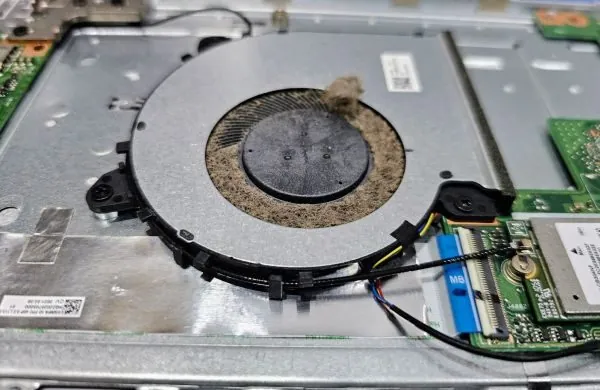
A laptop overheating fix usually comes down to three culprits: dust blocking the fan and heatsink fins, thermal paste that dried out years ago, or a fan that is dying. All three are same-day repairs, and in Indore a full internal clean with fresh thermal paste typically costs ₹400–1,000 (as of 2026). This guide walks through the symptoms, the safe DIY checks, what a professional service actually does, and the model-wise price reality.
How to Know It's Overheating (Not Something Else)
- Random shutdowns or restarts under load — the thermal cutoff protecting the CPU. Games, video calls and rendering trigger it first.
- Sudden slowdowns while hot — thermal throttling: the processor deliberately slows to shed heat. Fast after startup, sluggish after 20 minutes is the classic signature.
- Fan roaring constantly, even at idle — either genuine heat or a clogged sensor-driven response.
- Keyboard deck or underside uncomfortably hot — palm-rest heat above 45°C or so is a complaint we hear daily in summer.
- Confirm with software: free tools like HWMonitor or Core Temp read CPU temperature directly. Idle above ~60°C or sustained load above ~95°C means the cooling system needs attention. Intel's own guidance on processor temperature limits is published on intel.com.
Why Laptops Overheat — the Real Causes Ranked
| Cause | How common (our workshop's experience) | Fix | Typical Indore cost (2026) |
|---|---|---|---|
| Dust-clogged heatsink fins & fan | Most common by far | Full internal clean | ₹300–600 |
| Dried/pumped-out thermal paste | Very common on 3+ year machines | Paste replacement (with clean) | ₹400–1,000 combined |
| Failing/noisy fan bearing | Common | Fan replacement | ₹800–2,500 with part |
| Blocked vents from soft-surface use | Behavioral — beds, sofas, laps | Habit change / cooling stand | ₹0; stands ₹800–2,000 |
| Malware or runaway background process | Occasional | Software cleanup | ₹200–500 |
| Failing battery swelling against internals | Less common, serious | Battery replacement | See battery guide below |
Prices are our approximate market ranges for Indore; exact quotes depend on model and part availability. Gaming laptops with dual fans and heavy heatpipe assemblies sit at the top of each range.
Safe DIY First Aid (Do These Today)
- Move to hard, flat surfaces. A laptop on a blanket suffocates — most intake vents are on the bottom.
- Blow out the vents from outside with short bursts of air (a blower or canned air), fan side first. Do it outdoors; the dust cloud from a 3-year-old laptop is impressive.
- Check Task Manager (Ctrl+Shift+Esc): a process pinning the CPU at 100% cooks the machine from software. Browser tabs, crypto-mining malware, and stuck update services are the usual suspects.
- Update BIOS and drivers — fan-curve fixes ship in updates more often than people expect.
- Elevate the rear by even 2 cm (a ₹100 stand or two bottle caps) to open airflow; a powered cooling pad helps marginal cases but cannot rescue a clogged heatsink.
What NOT to DIY
Opening modern thin-and-light laptops involves fragile plastic clips, hidden screws under feet, and ribbon cables that tear if the panel is lifted at the wrong corner. MacBooks add pentalobe screws and glued batteries. Applying thermal paste wrong (too much, wrong spread, air pockets) can leave temperatures worse than before. If the machine is under warranty, opening it yourself usually voids the seal. Our rule of thumb: external cleaning and software checks are yours; anything requiring the back panel off is a ₹400–1,000 professional job that takes us 45–90 minutes — book it through our repair booking page and it's typically same-day.
What a Professional Laptop Overheating Fix Includes
- Full disassembly to the heatsink assembly; fan blades and fin stack cleaned properly (not just blown from outside).
- Old thermal compound cleaned off CPU/GPU dies; fresh quality paste applied in the correct quantity; thermal pads checked and replaced where crushed.
- Fan bearing tested under load — a fan running slow at full duty is replaced, not lubricated (lubrication is a two-week fix at best).
- Before/after temperature benchmark so you can see the delta — a proper service typically drops load temperatures by 10–25°C on a clogged machine.
- Hinge, vent and bottom-panel inspection — cracked hinges and missing feet quietly wreck airflow.
If diagnostics reveal the heat was a symptom — a swollen battery pressing the board (see our battery replacement price guide) or a GPU issue on gaming models — we quote before touching anything. Overheating that has already caused shutdown-loops or no-boot situations moves into board-level territory; our general Indore repair price list covers those scenarios, and MacBook thermal service has its own pricing in the MacBook guide.
Prevention: the 6-Month Rhythm
| Habit | Frequency | Why |
|---|---|---|
| External vent blow-out | Monthly (dusty seasons: fortnightly) | Slows internal accumulation |
| Professional internal clean | Every 12–18 months (heavy use: 12) | Fin stacks clog from inside; paste ages |
| Hard-surface use / stand | Always | Bottom intake needs clearance |
| Temperature spot-check | Quarterly | Catch degradation before symptoms |
Indore's dust and 40°C+ summers are genuinely hard on laptop cooling — machines here clog faster than the global service intervals assume. Sustained heat also ages the battery chemistry and stresses GPU solder joints, so the ₹500 clean is cheap insurance against the ₹5,000+ repairs it prevents. Not sure which category your symptoms fall into? Send us the details — describing the symptom pattern (when it shuts down, how hot, how loud) usually lets us give a price range over the phone.
Special Cases: Gaming Laptops, MacBooks and Ultrabooks
Three categories deserve their own notes because their thermal designs fail differently. Gaming laptops (dual-fan, multi-heatpipe designs from the mainstream gaming lines) generate the most heat and clog the fastest — their dense fin stacks act like dust filters. They also benefit most from the extras: replacing crushed thermal pads on VRMs and VRAM alongside the paste, and in appropriate cases a measured undervolt, which can drop load temperatures another 5–10°C at zero hardware cost. Expect the top of the service price range and ask specifically whether pads are included. MacBooks run a deliberately quiet fan curve and rely on the aluminium chassis as a heatsink, so they feel hot at the deck even when healthy; the real red flags are fan noise changes, kernel task slowdowns and thermal shutdowns. Apple's glued batteries and pentalobe screws make this strictly a workshop job, and paste choice matters more because the margins are thinner. Fanless ultrabooks and many thin-and-lights cannot be 'cleaned' into better performance — their limits are design limits — but dried paste still degrades them, and a repaste restores the original (modest) thermal envelope. Across all three, the same rule holds: if temperatures were once fine and have worsened, service restores them; if the machine has always throttled under your workload, the honest fix is workload management or different hardware, and we'll tell you which case yours is before charging anything.
The Monsoon and Summer Factor in Indore
Local climate genuinely changes laptop thermal behaviour, and our service bench sees it in waves. April to June, ambient rooms in Indore regularly cross 35–40°C without air conditioning — and every degree of ambient temperature is a degree less thermal headroom, which is why machines that survived winter start shutting down in May. If your laptop only misbehaves in the afternoon heat, try the same workload in a cooled room before assuming hardware failure; if it still runs hot, the cooling system needs service and summer merely exposed it. July to September brings the opposite problem: monsoon humidity accelerates dust caking — moist dust adheres to fan blades and fin stacks instead of blowing through, forming the grey felt layer we peel off heatsinks all season. Humidity also corrodes exposed connectors on machines stored unused; run stored laptops for an hour weekly during monsoon. Practical seasonal rhythm for Indore users: schedule the professional internal clean in March, ahead of the heat, and do external vent blow-outs monthly through the monsoon. Machines serviced on that calendar almost never appear on our emergency bench in May — and the ones that do arrive are almost always running last year's paste through this year's summer.
Laptop Overheating Repair Cost by Scenario
Ranges below are indicative only and may vary by laptop model, fault severity, and market conditions in Indore. A physical inspection is needed for an accurate quote.
- Dust cleaning only (fan and vents): Rs 800 - Rs 1,500, may vary by model
- Cleaning plus thermal paste reapplication: Rs 1,200 - Rs 2,500, may vary by fault
- Cooling fan replacement: Rs 1,500 - Rs 4,000, may vary by model and part availability
- Heat-related motherboard/GPU repair (advanced cases): priced separately after diagnosis, generally higher than routine cleaning
Warning Signs Your Laptop Is Overheating
- Fan running loud and constant, even during light browsing
- Bottom panel or keyboard area uncomfortably hot to touch
- Sudden shutdowns during video calls, gaming, or heavy multitasking
- Noticeable slowdown or lag that improves once the laptop cools down
- Screen dimming automatically or a temperature warning message appearing
- A burning or unusual smell near the vents (stop use immediately if this occurs)
Simple Habits That Reduce Overheating Risk
- Always use the laptop on a hard, flat surface, never on a bed or cushion
- Keep vents clear of dust, hair, and fabric fibers
- Schedule internal cleaning roughly every 12-18 months, or sooner in dusty environments
- Use a cooling pad during extended gaming or video editing sessions
- Avoid blocking side or rear exhaust vents with cables or bags while in use
Prices shown are approximate 2026 Indore ranges and may vary by device model, the exact fault, part availability and current market rates. We confirm a fixed per-fault quote after a free diagnosis — no surprise bills.
Frequently asked questions
What are the most common causes of laptop overheating in Indore's climate?
The most frequent cause of laptop overheating is dust and lint accumulation inside the cooling fan and heatsink fins, which restricts airflow over time, and this problem is often accelerated in Indore due to dust levels, especially if the laptop is used on beds, carpets, or other soft surfaces that block bottom vents. Dried-out or degraded thermal paste between the CPU or GPU and its heatsink is another very common cause, particularly in laptops older than two to three years, since factory thermal paste loses effectiveness over time and needs periodic reapplication. Other contributing factors include running heavy applications like video editing or gaming for extended periods without adequate ventilation, a failing cooling fan that spins slower than intended, and simply using the laptop in a hot room without any airflow around it. Identifying the exact cause through inspection is important because dust cleaning, repasting, and fan replacement each address different root problems.
How much does laptop overheating repair cost in Indore?
Basic laptop overheating fixes in Indore, involving opening the laptop, cleaning dust from the fan and heatsink, and reapplying thermal paste, typically cost between Rs 800 and Rs 2,500, and may vary by laptop model and how much disassembly is required to access internal components. If the cooling fan itself has failed or is making grinding noises and needs replacement, cost rises to roughly Rs 1,500 to Rs 4,000 depending on whether the specific fan model is a common stock part or needs to be sourced for a less common laptop. In more severe cases where prolonged overheating has caused damage to the motherboard, graphics chip, or has led to solder joint failures, repair costs can be significantly higher and may approach the cost of a logic board or motherboard repair, which is another reason to address overheating symptoms early rather than letting the laptop run hot repeatedly.
How can I tell if my laptop is overheating and needs professional attention?
Clear signs of overheating include the laptop's fan running loudly and constantly even during light tasks, the bottom or keyboard area becoming uncomfortably hot to touch, sudden unexpected shutdowns especially during demanding tasks like video calls or games, and noticeable performance slowdown known as thermal throttling, where the processor deliberately reduces speed to protect itself from heat damage. Some laptops display temperature warnings or automatically dim the screen and reduce brightness as a heat-protection measure, which is another signal worth paying attention to rather than ignoring. You can also check internal temperatures using built-in diagnostic tools or simple monitoring software, and if idle temperatures consistently sit above 70-80 degrees Celsius or load temperatures spike above 90 degrees, professional cleaning or repair is advisable. Catching these signs early and visiting a laptop repair in Indore shop before a complete shutdown occurs helps prevent more serious internal component damage.
Can I clean my laptop's fan and vents myself to fix overheating, or should I get professional help?
External cleaning, such as using a can of compressed air on visible vents while the laptop is off, can provide mild temporary relief but does not address dust built up deep inside the fan housing or on the heatsink fins, which is where most of the blockage actually accumulates. Opening a laptop to properly clean the internal fan and heatsink assembly, and especially to reapply thermal paste, requires careful disassembly since many laptops have delicate ribbon cables, small screws of varying lengths, and components that are easy to damage without experience or the right tools. Attempting a full internal cleaning yourself without proper technique risks static damage to components, misplaced screws causing case damage, or improperly reseated parts leading to new problems like a non-functioning keyboard or trackpad. For most users, a professional overheating fix in Indore is a safer and often faster route than a DIY internal cleaning attempt, particularly for newer or more tightly assembled laptop models.
How long does it take to fix laptop overheating at a repair shop in Indore?
A standard overheating fix involving disassembly, dust cleaning, and thermal paste reapplication typically takes between one and three hours at a laptop repair in Indore shop, with the exact time depending on how complex the laptop's internal design is and how many layers need to be removed to reach the fan and heatsink. Laptops with simpler bottom-panel access are usually quicker to service than ultrabooks or gaming laptops with more intricate internal layouts requiring careful disassembly of multiple components. If the diagnosis reveals a failed fan that needs replacement, turnaround may extend to same-day or next-day depending on whether the exact fan model is in stock locally or needs to be sourced from a supplier. Many shops offer same-day service for standard overheating cleaning if you drop the laptop off early in the day, though it is worth calling ahead to confirm availability, especially during Indore's dustier seasons when overheating complaints tend to increase.
What happens if I keep using my laptop while it is overheating?
Continuing to use a laptop that regularly overheats accelerates wear on internal components, since sustained high temperatures degrade solder joints connecting the CPU, GPU, and other chips to the motherboard, and can eventually cause intermittent failures or complete component death that requires expensive motherboard-level repair rather than simple cleaning. Repeated thermal throttling also means you are getting reduced performance from your laptop even when it does not shut down, so tasks take longer and the experience feels sluggish, defeating the purpose of using the laptop for demanding work in the first place. In the worst cases, prolonged overheating can shorten battery lifespan due to heat exposure, warp certain plastic components near the vents, and in laptops with dying fans, eventually lead to a complete fan motor failure that then causes even faster heat buildup. Addressing overheating promptly at the first signs, rather than tolerating it, is significantly cheaper than dealing with cascading heat-related damage later.
Does laptop overheating affect performance even before it causes a shutdown?
Yes, modern processors are designed to automatically reduce their clock speed, a process called thermal throttling, as soon as internal temperatures approach unsafe limits, which means your laptop can feel noticeably slower, laggy, or unresponsive during demanding tasks well before you ever experience a full shutdown. This is often mistaken for a software problem or a laptop simply being old, when in fact the underlying processor and graphics chip may be fully capable but are being deliberately held back to prevent heat damage. Users doing video editing, gaming, or running multiple heavy applications simultaneously are most likely to notice this throttling behavior, as sustained workloads push temperatures higher over time compared to brief bursts of activity. If your laptop feels slower than it used to, especially during longer sessions of intensive use, an overheating diagnosis at a laptop repair in Indore shop can determine whether cleaning and repasting will restore the performance you are missing.
How do I choose a good laptop repair shop in Indore for an overheating fix?
Look for a shop that performs a proper diagnostic, including checking actual internal temperatures with monitoring software before and after service, rather than simply promising a fix without evidence of the improvement, since this transparency helps confirm the repair actually solved the problem. Ask whether they use quality thermal paste rather than the cheapest available option, since paste quality and correct application technique significantly affect how well heat transfers away from the CPU and GPU over the following months. It is also worth asking whether the shop offers any short warranty period on the overheating fix, since if the problem returns quickly it may indicate incomplete cleaning or improper reassembly rather than a new issue. Checking that the shop has experience with your specific laptop brand, particularly for gaming laptops or ultrabooks with unusual cooling designs, and getting a clear price estimate before work begins are practical ways to choose a trustworthy overheating repair provider in Indore.
Can dust and heat damage from overheating be prevented with regular maintenance?
Yes, scheduling periodic internal cleaning, generally every twelve to eighteen months for typical home or office use and more frequently for laptops used in particularly dusty environments, significantly reduces the risk of overheating-related damage by preventing dust from building up to problematic levels in the first place. Using the laptop on hard, flat surfaces rather than beds, cushions, or carpets keeps bottom vents unobstructed and allows normal airflow, which is a simple habit change that costs nothing but meaningfully reduces heat buildup during everyday use. Laptop cooling pads with additional fans can also help for users doing sustained heavy workloads like gaming or video rendering, providing extra airflow that reduces strain on the internal fan. Combining these preventive habits with periodic professional cleaning at a laptop repair in Indore shop is generally far cheaper over the life of the laptop than dealing with reactive repairs after overheating has already caused throttling or shutdown issues.
Can I get same-day overheating repair service in Indore, and how do I book it?
Standard overheating fixes involving cleaning and thermal paste reapplication are commonly completed same-day in Indore for most laptop models, since the required parts, namely thermal paste and compressed air or cleaning tools, are typically always in stock and do not need to be sourced externally. The main variable affecting same-day availability is shop workload and how complex your specific laptop's disassembly is, so it helps to call ahead and describe your laptop's symptoms, such as fan noise, hot spots, or shutdown frequency, before visiting. To confirm same-day turnaround and avoid a wasted trip, especially if your laptop may need a replacement fan rather than just cleaning, it is best to call first, for example at +91 90098 48418, describe the model and symptoms, and ask whether walk-in diagnosis is available that day or whether booking an appointment slot is recommended.
Authoritative reference
Laptop — Wikipedia ↗Read more of our guides.
Written and reviewed by Pankaj Kumawat, founder of Indore Tech Guru. Questions? Call or WhatsApp +91 90098 48418. Prices are approximate 2026 Indore rates and change over time — always confirm at the shop before you commit.
Keep reading